

Appendix (and Satellite)
Where I put stuff when I can't think of anywhere else to put it, though, to be frank, there's some pretty useful (and interesting) stuff on here, even though I say so myself...
Subject list :
- Satellite
- UHF/VHF frequencies, wavelengths & bands.
- Basic Ladder Safety - An important page !
- Distribution systems / system work
- Lightning risk with aerial installations
- 50 Ohm / 75 Ohm impedance mismatch loss
- Balun tests
- Digital to analogue transmission power equivalence
- Why does my aerial read short circuit across the input?
- - incl: Capacitors, coils and resistors
- Cable route on a centre mount aerial : round the reflector?
- Painting aerials and satellite dishes
- Why does my signal improve (or deteriorate) at night ? (Tropospheric propogation)
- Tide Fade
- Is my aerial amplifier faulty ?
- - Testing mast head amplifiers / power supplies
- Diplexer v splitter/combiner losses
Digital to analogue transmission power equivalence
Even the higher post switchover digital power outputs are all significantly lower than the analogue ones were but the nature of the digital signal means the output levels do not have to be as high to give a noise free picture, i.e. no “grainyness”. Theoretically the Digital signal only needs a 26dB signal to noise ratio to achieve a “perfect” picture, as opposed to the analogue which requires around 44dB. Thus the Digital signal received at the antenna can be 18dB lower and still give (what passes for) a perfect picture. This is why, after switchover, when the digital transmission powers were all increased significantly, all transmitters outputs are actually higher (relative to what they theoretically need to be) than they were when transmitting analogue. However, it must be remembered that the consequences of a digital drop out are more annoying to the viewer than for a flash of interference on an analogue picture....
Also see "lower (power) is higher" and actual signal levels.
Why does my TV/FM/DAB aerial read short circuit ?
Well that really is a question.
Firstly not all aerials read short circuit across the input, half an hour with a meter on a load of aerials round our shop produced the results shown in the table.
NOTE : these readings are at the aerial, or at a good cable connected to it. Obviously the same results would not necessarily be the same if measured through an isolated wall plate (or isolater), or an amp or a diplexer !
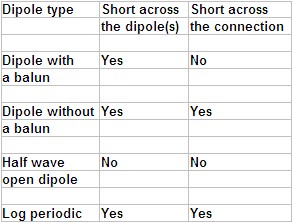
But why do any aerials read short?
Well that's the wrong question in a way because the dipole(s) are just "generating" the tiny current induced by the signal. Whether the dipole(s) is short circuit or open circuit is actually irrelevant, all that counts is that the dipole(s) are resonant with the signal to be received. Having said that the information in the accompanying table can be useful in fault finding ! Note : if you split a Log Periodic aerial at the clamp end you should then get an O/C reading (and, as an aside, it will stop working....), this fact is very handy if testing the cable.
Whilst we're on the subject...
RF isn't a DC voltage *, it's AC, and it's not just AC but very high frequency AC. In fact for TV/FM/DAB we're talking MHz (where 1 MHz equals one million Hz). When measuring the dipoles I used a standard multimeter set on Ohms, but I also tried a 100 kHz ESR [Effective Series Resistance] meter (i.e. I was checking the impedance at 100kHz) and I still got more or less the same results as I did with the multimeter at zero Hz (i.e. DC). It would have been interesting to see what results I'd have got (particularly across the baluns) using an ESR meter working at 600MHz ! On the other hand, in some circumstances only 50Hz can make a big difference in impedance. If you used a meter on Ohms to check the winding of a mains transformer it'd read dead short but to mains AC [at only 50Hz] it certainly isn't short circuit, if it was it'd blow the fuse (or the winding).
With relevance to this article one should always bear in mind that AC currents can be induced from one circuit into another (that's how transformers work) so in actual fact you don't always need continuity [as read by a multimeter on Ohms] between two points on a particular circuit for the signal to pass between them.
Just to finish this little lesson, the three major types of electrical components (excluding semi conductors) behave very differently as regards resistance to the passage of AC and DC current :
Capacitor
AC = decreases as frequency rises
DC = open circuit
Inductor / Coil / Winding
AC = increases as the frequency rises
DC = short circuit
Resistor
AC = constant as the frequency rises
DC = constant as the frequency rises
If you start putting coils and resistors and capacitors in networks/circuits you then start getting some very odd results (i.e. resonant at certain frequencies), and that's the basis of RF transmission and reception !
* AC = Alternating current (like mains electricity) DC = Direct Current (like from a battery)
Cable route on a centre mounted aerial : forward or backward ?
Including does it make any difference to the signal if the dipole is fitted "the other way" ?
About 20 years ago aerial manufacturers started advising routing the cable (on a centre mounted aerial) back round the reflector and then onto the pole [see adjacent picture]. I think this was something to do with aerial benchmarking where everything had to be exactly as tested for the benchmark to be granted for the aerial concerned, well that and a big fat cheque (made out to the aerial benchmark agency), obviously. I did some crude tests of aerials where the cable was routed forward or backwards (as "advised") and I couldn't really measure any significant difference and it's certainly much neater to have the cable running forward then down the cradle and pole. In November 2020 a customer asked a more specific question : on an aerial where the dipole can be removed and fitted facing the other way (thus making it much easier and neater to route the cable forwards) would it make any difference to the signal ? I had to say I didn't think so and it didn't seem to make much difference when I tried it but eventually I got round to asking Bill Wright, and his reply is below :
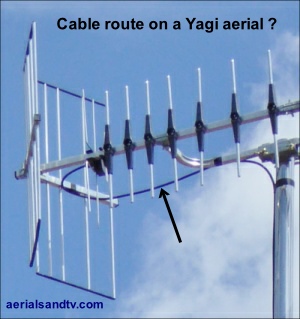
On a Yagi aerial does it make a significant difference if you reverse the dipole fitting so the cable exits at the front and then down the boom ?
Assuming you mean on a centre-mounted aerial (usually an 18 element) I would always do this. I just don’t like to see loops of coax handing down. If the aerial has a balun, and if the balun is truly effective, the cable is ‘dead’ signal wise, so it can’t pick up signal and transfer it to the dipole terminals (where it will have a random phase relationship with the signal received directly by the dipole). So in that respect the cable position doesn’t matter. However the cable is conductive and obviously introducing any conductive object of significant size into the aerial’s near field might have an effect. So I’ve always tried to take the cable away from the aerial as neatly as possible. That normally means fixing it to the boom, cradle , and mast, every inch of the way.
Regarding the dipole itself, since it is electrically balanced it shouldn’t matter which way round it is.
So, basically, Bill also doesn't think it'd make any significant difference.
Note : A Yagi18 (or Yagi10) has an "inclined dipole" which is asymmetric, and therefore not suitable to have its dipole reversed. On them one can loop the cable round the reflector or loop it back round under the dipole and then onto the boom. But, most importantly, whichever way you route the cable ensure it is in a downward direction just where it exits the dipole cover so as to limit water ingress.
Painting aerials and satellite dishes
Quite a few people want to paint their satellite dishes in an understandable attempt to camouflage the ugly things. It's also not unknown for some folks to paint their aerials. Thus we quite regularly get asked whether the paint would have any effect on reception but, to be frank, I didn't really know for sure so used to give a noncommittal answer implying I didn't think it'd make much difference. However, in October 2013 the MB21 E Mail list had a discussion on this very subject and the conclusion of the learned brethren was that painting aerials and satellite dishes wouldn't make any significant difference at all, though it may be a good idea to use spray paint so as to give a smooth finish, particularly with satellite dishes.
Tide fade
"Tide fade" is when the rising or dropping sea level alters the distance the reflected RF waves have to travel from the transmitter to the receiver. The significant point here being it doesn't change the distance the directly received waves have to travel, thus the relative phase of the direct and reflected signals changes. Theoretically if you have two identical signals 180 degrees out of phase you'd end up with zero signal! That's highly unlikely to ever happen but, apparently, you can get up to 40dB of signal drop off, which is a huge amount. I don't live near the sea so can't comment from experience but 40dB does sound an absolutely massive signal reduction to me! But what is certain is that you will often see alteration in signal level as the sea level rises and falls. As you would expect the degree of tide fade is lower with vertically polarised signals. See this BBC article on Tide Fade.
Why does my TV or radio signal improve (or deteriorate) at night ?
I read an interesting short article (on the above mentioned MB21 E Mail list) the other day, it was about Tropospheric Propagation. Basically the weather can affect how well you receive your signal (see below), but it must be born in mind that if your problem is co-channel interference (CCI) then your picture and/or sound may actually get worse !
For tropospheric propagation the argument goes that as atmospheric turbulence (due to convection from solar warming of the earth) reduces and the earth cools it is easier to form stable air layers of reduced refractive index which help to guide the signal beyond the daytime horizon. Temperature inversion created ducts are also more easily formed and can offer much reduced path loss. Hence, fringe area reception conditions gradually improve after dark and peak a little before dawn.
Higher frequencies are affected more than lower ones because the longer wavelengths require much larger atmospheric ducts, which are harder to form. UHF television is especially sensitive to these effects.
Within the service area signal enhancements of 10 dB or more are common (>10% of days). Close to the coast enhancements due to duct formation as land cools are also common. Ducting can bring CCI from very distant stations and so is generally regarded by broadcasters as a problem. The DX TV * enthusiast sees it differently.
If you want to read more there are loads of measurement campaigns described in BBC Research Reports, try this 1989 one for example. Also see Mike Willis's article on this subject.
Alwyn Seeds (SynOptika Ltd)
* DX reception = (long) distance.
I would only add that a 10dB increase in signal is very significant, as an example that's more than the difference in received signal between a large XB16 and a little DM 18 Log !
Diplexer v splitter / combiner losses
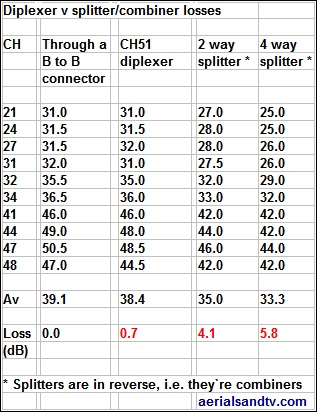
These basic tests compare a UHF/UHF diplexer to a “splitter in reverse combiner”, but I'd expect similar results if comparing a UHF / VHF diplexer and splitter.
This is not an in depth test, it's just a bit of messing about, but, because it indicated what we know to be true anyway I'm not prepared to go any deeper ! I simply used the signals on our bench* and fed them, in turn, through a back to back connector, a CH51 diplexer, a 2 way splitter, and a 4 way splitter. The results are pretty self explanatory and are listed in the table.
Some CHs show 0dB loss, I wouldn't expect zero loss through a diplexer. The explanation is that test meter wouldn't show up 0.5dB which is hardly anything. Any 0.5dB readings shown are the average of two.
Note how the loss on the diplexer increases as its splitting frequency is approached.
* I have to say they're a bit low but I didn't have time to find out what was causing the problem in our system, which isn't used much these days because we no longer repair TVs ! For the purposes of this test it doesn't matter anyway, we're only interested in the differences.
Also see this customer report :
Is my aerial amplifier faulty ? : Fault finding on aerial amplifiers.
It's often difficult to tell if your amplifier ("booster") is faulty, and particularly if the amp feeds more than one TV and the signal on all of them has gone off the natural conclusion to be drawn is that the amplifier must be the guilty party. However it is not that common for amps to fail! The “fault” is actually much more likely to be down to the aerial or the cable or the tuning or 4G etc etc.
If fitting the amp for the first time, have you got too much signal ? Try bypassing the amp (or, even better, use an attenuator) to eliminate that possibility.
As with any electronic equipment the best way to ensure maximum reliability for your amplifier is to let it run as cool as possible, try not to place it anywhere warm or obstruct any vents it has in its casing.
Mains amplifiers.
The first question : is the indicator light (if fitted) on ? If the answer is yes it's even less likely that the amp is faulty, this is because the power supply (the “PSU” which converts the 240V mains into the low voltage DC used by the unit) is the most unreliable part of most electronic equipment and if the light is on then the PSU is running. It really is pretty uncommon (though not unknown….) to get a faulty amplifier where its light is still working. If no indicator light is fitted try to ascertain if the unit is slightly warm or buzzing, this is an indication the PSU is running, though this is a rather less reliable diagnosis than any indicator light ! The next diagnostic step is to bypass the amp (direct to one TV) and then see if the fault is still present. NOTE : you must bypass the amp, do not leave it in the system and just turn it off because then you then won't get any signal regardless of whether amp is actually faulty. If bypassing the amp gives you a signal that you didn't have with it in circuit (even if that signal is imperfect) that indicates the amp is faulty, though you must remember that the great majority of multi output mains amps don't actually provide much gain so the signal shouldn't actually be that much worse than it was before! If your mains amp has line power and this is being used to drive a mast head amp also read the section below.
Mast head amplifiers.
As with mains amps the first question is : is the indicator light (on the power supply) on ? If it is on but has changed colour (often from green to red) this usually indicates a faulty mast head amp or a short in the cabling somewhere. If you disconnect the cable into the PSU (from the mast head amp) and the light changes back from red to green then the fault would usually be the amp or the cabling. Next, if possible, try disconnecting the cable at the mast head amp. If the light is still red but changes to green when disconnected at the PSU then that indicates the cable might be faulty. On the other hand if it remains green but changes to red when reconnected to the mast head amp that indicates a faulty amp. It must be said that it's pretty rare for the mast head amp itself to fail (unless it has had water in it of course....) because as stated above it is the power supply that is generally the least reliable part of most electronic units. The option of bypassing the power supply (to check it) is not open to you - unless you can get to the M/H itself - because that will obviously mean the M/H amp won't run and therefore you won't get any signal! If you can get to the M/H amp then try bypassing that. As an alternative (if you have a multi meter) try checking if the PSU is giving out 12V, if the PSU has screw on F connector sockets you may need to use a pin or similar to get the voltage off the centre connection. If the PSU is giving 12V out then it's almost certainly not faulty, though we have had the odd one which would give out 12V but only off load. If you're electronically savvy you could test it under load by using a resistor (I'd suggest a 220Ω load test resistor) and then check the voltage across that.
Even more rare, in Jan 2025 we had an intermittent TV signal at home. I took the simpler of our meters home (because the other one which gives a BER - digital bit error rate - had a faulty battery) and checked the signal : the signal level and the signal to noise ratio were both fine, yet the both PVRs were both giving poor signal and breaking up. There was no source of co-channel so I was mystified..... Next day I took a spare PSU home and swapped it over, hey presto signals were fine. I then temporarily swapped back to the original one just to check the signals were still poor with that, and they were. So I can only assume the PSU was putting interference onto the signal and I suspected a smoothing cap but when I checked them at work (using an ESR meter) the main smoother one was a bit low but not that bad. Weird...... If it'd been back in analogue days one could have seen the interference on the picture, in fact if the mains smoother on the TVs (internal) PSU goes U/S one would see a huge "hum bar" on the picture as mains frequency was the same as analogue frame rate (i.e. 50Hz) !
Other potential problems with mast head amps are isolated wall plates which won't pass the 12V DC sent from the PSU to the mast head amp. [link]
Digilink (IR return) amplifiers. To be read in conjunction with "Mains amplifiers" (above)
There are a few additional things to bear in mind when attempting to ascertain if a Digilink amp is faulty. First question : have you got the feed to the RF2 (or IO Link) switched on at the Sky box ! The next most common cause of problems with Digilink amps are isolated wall plates which will not pass the 9V DC (given out by the Sky box or IO Link) required to run any remote powered Digilink amp. They can occasionally also give problems with the IR return signal too. An additional problem was created in summer 2013 by that bunch of awkward money grabbing wazzocks (i.e. Sky) when they deleted the RF2 output from their boxes so you now have to buy the aforementioned IO Link. Not only is this extra expense and complication but most IO Links only provide sufficient current to run one Digilink “Eye” and they will not power a remote powered amp *. If that option is required you need a separate PSU which you plug into the IO Link (though some of the cheapo IO links do not have a socket for a PSU input). On the subject of remote powered amps they (certainly the one we sell) are very reliable, mainly because they have no power supply, and this, as previously stated, is generally the most unreliable part of any electronic unit. As of Nov 2019 when this article was rewritten we've never had a faulty one, every single one sent back “faulty” by customers has proved to be OK and the fault was elsewhere.
* The IO links we sell will run two digieyes.
Also see ATV’s returns policy for amplifiers.